
Introduction
You set up staging.example.com on Monday. It has no links pointing to it and isn't in any sitemap, and you have told nobody about it. You request a TLS certificate so the browser stops complaining, and before lunch something you have never heard of is already knocking on the new host.
Nobody guessed the name, and your DNS is fine. The certificate gave it away. Every certificate that a browser trusts is first written into a public, append-only record called a Certificate Transparency log (a CT log). Anyone can search those logs with a free tool like crt.sh, and automated scanners watch them around the clock.
Below: what Certificate Transparency is and why it exists, how CT logs work, why they turn subdomain enumeration into a simple search, how to find all subdomains of a domain the way a stranger would, and what a wildcard certificate and other options can and cannot hide.
What Is Certificate Transparency, in One Paragraph
Certificate Transparency (CT) is a system of public logs that record every TLS certificate issued by a publicly trusted certificate authority (CA). Before a browser accepts a certificate, it checks for proof that the certificate was logged. Logs only grow: entries are never edited or deleted. The point is detection. If a CA issues a certificate for your domain to somebody else, by mistake or because it was breached, the certificate shows up in the logs where you can find it. The side effect is that every hostname written into a certificate becomes public, permanently. The first version of the standard is RFC 6962 (2013); its successor, CT 2.0, is RFC 9162.
Why Certificate Transparency Exists
The web's trust model rests on certificate authorities. Your browser trusts a long list of them, and any one of them can issue a certificate for any domain. For years there was no reliable way for a site owner to know which certificates existed for their own name.
That weakness was exposed in 2011:
- Comodo, March 2011. Fraudulent certificates were issued for sites including
mail.google.com,login.yahoo.comandaddons.mozilla.org. - DigiNotar, summer 2011. A Dutch CA was breached, and a fraudulent certificate it issued for Google was used against people primarily located in Iran. Chrome stopped trusting every CA that DigiNotar operated.
- Symantec, September 2015. A Symantec-owned CA issued a certificate for
google.comandwww.google.comthat Google never requested. Google found it in the Certificate Transparency logs, which Chrome already required for Extended Validation certificates, and published the details. Further questionable certificates turned up in the same logs.
The lesson behind CT is that you cannot stop every mistake by every CA, but you can make every certificate visible. RFC 6962 says it plainly: the logs "do not themselves prevent misissue, but they ensure that interested parties (particularly those named in certificates) can detect such misissuance."
How Certificate Transparency Logs Work
Four pieces make the system work: the log itself, the precertificate, the signed proof that comes back from the log, and the monitors that read it.
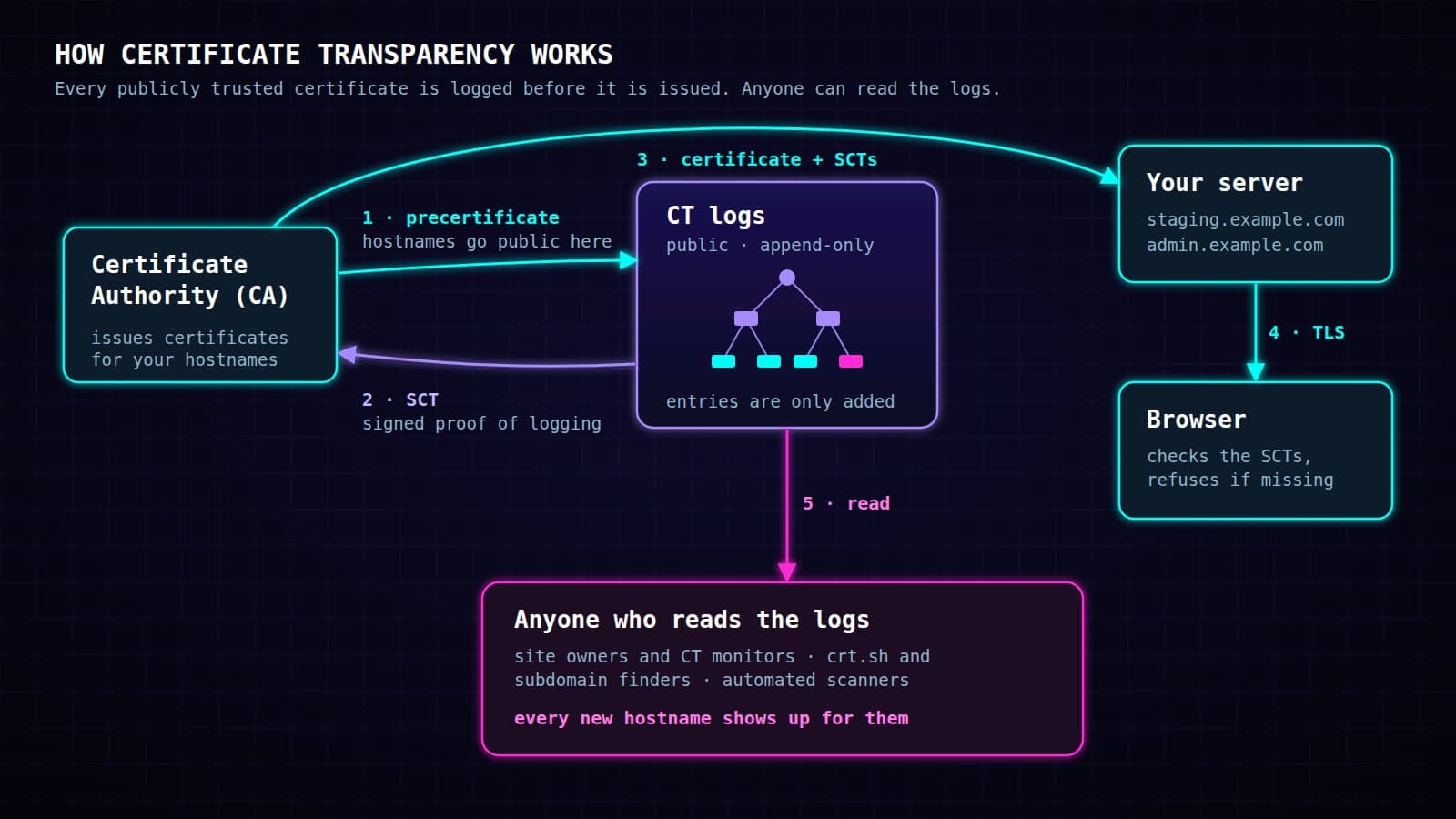
The log
A CT log is a server that accepts certificates and publishes them. It stores them in a Merkle tree, a structure in which every entry contributes to a single cryptographic fingerprint of the whole log. That makes it append-only in a way anyone can check: an operator cannot remove or alter an old entry without the fingerprint changing. Google's CT project sums it up as "certificates can only be added to a log, not deleted, modified, or retroactively inserted."
The precertificate
A CA does not wait for the final certificate. It first submits a precertificate, a copy of the certificate carrying a special "poison" extension so that no browser will accept it, gets proof of logging back, and only then issues the real certificate. Your hostname is therefore published before the certificate it belongs to even exists.
The SCT
The proof of logging is a Signed Certificate Timestamp (SCT), the log's signed promise to include the certificate. The CA embeds SCTs from several independent logs inside the final certificate. When your browser connects, it checks them.
Monitors and auditors
Monitors read logs continuously and look for certificates of interest, such as every new certificate that mentions your domain. Auditors check that logs behave honestly. Browsers, CAs, security companies and, unavoidably, attackers all run monitors.
Logs are split into shards by the certificate's expiry date. Current shards cover half a year each, so a log is really a family of logs with names like 2026h2. Newer logs use a "static" or "tiled" design that serves the tree as plain files. Chrome requires those logs to include a new certificate within one minute. The older RFC 6962 logs are allowed up to four hours.
Browsers Enforce It: ERR_CERTIFICATE_TRANSPARENCY_REQUIRED
CT works because browsers refuse certificates that skip it.
- Chrome requires CT for all publicly trusted TLS certificates issued after 30 April 2018. A certificate without enough valid SCTs is rejected, and the visitor gets a full-page warning with the error
net::ERR_CERTIFICATE_TRANSPARENCY_REQUIRED. Today Chrome wants two SCTs for a certificate valid up to 180 days and three for a longer one, from at least two different log operators. - Safari and Apple platforms have their own CT policy. In Apple's words, certificates that fail it "will result in a failed TLS connection, which can break an app's connection to Internet services or Safari's ability to seamlessly connect."
- Firefox enforces CT by default on desktop since version 135 (early 2025). Its error is
MOZILLA_PKIX_ERROR_INSUFFICIENT_CERTIFICATE_TRANSPARENCY.
If you ever see one of those errors on your own site, the certificate was not logged properly, and the fix belongs to your CA. Certificates from a private CA, one that only your own devices trust, are outside all of this: CT applies to publicly trusted CAs only, and public logs won't even accept private certificates.
Subdomain Enumeration: Why Your Subdomains Are Public
Subdomain enumeration means building a list of the hostnames under a domain. It used to take guesswork and brute force. Certificate Transparency turned most of it into a lookup. A certificate lists every hostname it covers in a field called the Subject Alternative Name. Once logged, the whole certificate is public, and that field with it. Chrome's own page for site operators puts it bluntly: the domains a certificate is for "will be included in the Certificate Transparency log."
Four properties turn that into a leak:
- It is complete. If a hostname has a publicly trusted certificate, it is in the logs. A browser-trusted certificate cannot be issued for a name without publishing that name.
- It is early. The precertificate is logged before issuance, so the name is public before the site goes live.
- It is permanent. Logs are append-only. A certificate that expired years ago is still there, and mirrors keep copies even after an individual log is retired.
- It is watched. Let's Encrypt's FAQ warns that shortly after a certificate is submitted, "automated CT crawling bots will be able to discover your domain, attempt to access it." The CT 2.0 standard notes in its security section that logs let malicious monitors "learn about the existence of domain names that might not otherwise be easy to discover," and that some subdomain labels "may reveal information about the service and software" behind them.
The labels make it worse, because they are rarely random and usually describe what the host does:
staging,dev,test,beta: unfinished software, often with weaker settings.admin,panel,cpanel,jenkins,grafana,kibana: management interfaces and the software behind them.vpn,remote,sso,mail: the entry points of an organisation.clientname.example.com,newproduct.example.com: business relationships and products before they are announced.
For an attacker, the list of every name you ever got a certificate for is a ready list of what to probe first.
Shorter certificates, more entries
Certificate lifetimes are shrinking. Under the CA/Browser Forum's Baseline Requirements, the rules every public CA follows, the maximum lifetime fell from 398 to 200 days for certificates issued from 15 March 2026. It drops to 100 days in March 2027 and 47 days in March 2029. Let's Encrypt plans to move its default from 90 to 45 days by 2028. Every renewal is a new certificate, and every new certificate is logged again, so your hostnames are republished several times a year.
Find All Subdomains of a Domain with crt.sh
The quickest way to judge the exposure is to look at your own domain the way a stranger would: run a certificate search for it.
The Subdomain Finder on packet.guru does exactly this. It searches Certificate Transparency data through crt.sh and lists the hostnames that have ever appeared in a certificate for the domain. Online subdomain finder and subdomain scanner tools often query the same logs. If you run it against your own domain, you may find a few names you had forgotten about.
A few things help when reading the result:
- crt.sh is a mirror, not a log. It is a public certificate search engine over CT logs, run by the CA Sectigo, and it is the standard tool for this job. It reads the logs on its own schedule, so the newest certificates can take a while to appear. An empty result for a name you created yesterday does not mean the name is private.
- Wildcard entries such as
*.example.comare part of the logs too. They reveal that a zone exists without naming the hosts in it. - Old names count. A host you shut down two years ago is still listed. Check that its DNS record is gone as well, because a forgotten record pointing at a released cloud resource is a classic route to a subdomain takeover.
What is crt.sh, and is it safe?
crt.sh is a free website where anyone can search Certificate Transparency logs by domain name. Security teams use it to inventory their own hostnames and investigate suspicious certificates, and attackers use it for reconnaissance. Is crt.sh safe? It only reads public data, and searching it reveals nothing new about your domain to anyone. Everything it shows was already public.
Certificate Transparency Monitoring and CAA Records
The same transparency that exposes your hostnames also works for you. CT was built so that domain owners can spot certificates they did not ask for.
- Certificate transparency monitoring. A CT monitor watches the logs and alerts you when a certificate is issued for your domain. Cert Spotter by SSLMate is a dedicated service. Cloudflare offers CT Monitoring for domains on its platform. crt.sh also publishes a feed for any search, which any feed reader can follow. One limit to know: these alerts watch your names. Cloudflare's documentation notes that its monitoring does not catch lookalike domains, so a certificate for
cloudf1are.comwould not trigger an alert forcloudflare.com. - CAA records. A CAA record in DNS (RFC 8659) lists the CAs allowed to issue certificates for your domain, and CAs must check it before issuing. It does not hide anything, but it narrows who can mis-issue in the first place, and a monitor tells you if someone tries anyway.
For many organisations, a CT search is also the most complete inventory of their own public hostnames, and security teams use it to find forgotten services before someone else does.
How to Hide Subdomains: Wildcard Certificates and Other Options
There is no setting that keeps a publicly trusted certificate out of the logs. Name-redaction schemes were proposed while CT was being designed and abandoned. Chromium's documentation states that "Chrome does not support any method for hiding domain names or other information within publicly-trusted certificates, nor are there any plans to support such mechanisms." What you control is which names end up in certificates at all.
| Approach | What it hides | The trade-off |
|---|---|---|
| Wildcard certificate | The individual host names under one level, e.g. everything under *.internal.example.com | The wildcard itself is logged; it covers one level only; every host shares one private key |
| Private CA | Everything: private certificates are never logged | Works only on devices you manage and have told to trust that CA |
| Neutral host names | What a host is for (a7.example.com instead of jenkins-prod) | The host is still listed; it only stops advertising its software |
| Split-horizon DNS | Internal DNS records from outside resolvers | Hides DNS answers, not CT entries; a name with a public certificate is still public |
| Removing an old name | Nothing that is already logged | Logs are append-only; old entries stay forever |
Does a wildcard certificate hide subdomains?
A wildcard certificate (a wildcard SSL certificate such as *.example.com) is the usual answer to "how do I hide my subdomains", and it helps, but only partly. Chrome's guidance describes them as able to "limit how much of the domain is disclosed", and adds that they "require greater care" with the private key. If the same key serves twenty hosts, stealing it from the weakest one compromises all twenty. Let's Encrypt issues wildcards only through the DNS-01 challenge, which proves control of the DNS zone rather than of a web server.
The realistic approach combines these steps. Keep internal services on a private CA where you manage the devices. Use a wildcard for groups of hosts that must be public but need not be listed one by one. Choose names that describe nothing. And treat everything that has ever been in a public certificate as public.
Other Ways Subdomains Leak
Certificate Transparency is the largest source, but not the only one.
- Zone transfers. A misconfigured DNS server may hand its whole zone to anyone who asks for an AXFR transfer. RFC 5936 asks DNS software to let administrators restrict transfers to specific clients.
- DNSSEC zone walking. Zones signed with the older NSEC records can be enumerated name by name. NSEC3 was designed to make that harder.
- Passive DNS. Commercial and research datasets record DNS answers seen on real networks, so a name that was ever resolved may be in someone's database.
Each of these leaks a name through a mistake or an old design. CT publishes the name even when everything is configured correctly.
FAQ
Q: What is Certificate Transparency in simple terms?
A public, append-only list of every TLS certificate that browsers trust. CAs must log each certificate before browsers will accept it, so site owners can spot certificates they did not request, and everyone else can see which hostnames have certificates.
Q: Can anyone find all subdomains of my domain?
Anyone can find every subdomain that ever had a certificate from a public CA, by searching the Certificate Transparency logs. Hosts that never had a public certificate are not in the logs, though they can leak through DNS or other sources.
Q: What is crt.sh used for, and is crt.sh safe?
crt.sh is a free search engine over Certificate Transparency logs, operated by Sectigo. People use it to list the certificates and hostnames of a domain, to investigate certificates, and to follow new issuance for a domain through its feed. It only shows data that is already public, so searching it is safe.
Q: Can I remove my certificate or subdomain from CT logs?
No. Logs are append-only by design, and no browser supports redacting names. Revoking a certificate makes it invalid, but the log entry stays.
Q: Does a wildcard certificate hide my subdomains?
Partly. The individual hosts under the wildcard are not named, but the wildcard entry itself is logged, it covers only one level, and any host that gets its own certificate is listed separately. The hosts also share one private key.
Q: Why does Chrome show net::ERR_CERTIFICATE_TRANSPARENCY_REQUIRED?
The site's certificate does not carry enough proof that it was logged. Visitors cannot fix it. The site owner has to get a correctly logged certificate from the CA.
Sources
- RFC 6962: Certificate Transparency and RFC 9162: Certificate Transparency Version 2.0, IETF.
- Certificate Transparency in Chrome and the Chrome CT policy, Chromium project.
- Apple's Certificate Transparency policy, Apple Support.
Curious what the logs already say about a domain?
The Subdomain Finder lists every hostname that has appeared in a public certificate for it. To check the certificate a site serves right now, use the SSL Checker.